
A Little Bit of Video Theory for Founders
You don’t need to know about the latest video trends, three-point-lighting set-ups and how aperture works in order to make videos for your business, because where the F does it STOP (that’s a camera joke, if you didn’t get it, you’re in the right place!)
But understanding a little bit of the theory behind video can help you make better decisions about what you’re creating, how you’re creating it and what actually matters.
So here’s a little bit of Video Theory, perfect if you’re a Founder looking to make videos for yourself – or get someone in to do them for you.
So let’s start with the important question, what is actually “good” when it comes to video.
What makes a “good” video?
Before getting too caught up in making videos look professional, let’s think about what actually makes a good video.
From your perspective, a good video is one that helps you achieve whatever business or marketing goal you created it for.
From your audience’s perspective, a good video has a clear point and is easy to understand.
So a lot of the success of a video comes down to two things:
WHAT you say and HOW you say it.
The WHAT is the substance of the video: the idea, information, story or message.
The HOW is how effectively you communicate it.
You can have something brilliant to say, but communicate it badly.
Equally, you can be brilliant on camera without really saying anything.
You need both.
Production Values
Production values are things like image quality, sound and editing.
They matter, but they come second to the message.
Before worrying about production, make sure you’ve got these three things down:
- Purpose – the video has a clear reason to exist
- Flow – the viewer can easily follow it from one point to the next
- Spoken language – it sounds like something you’d actually say, rather than something written to be read
From there, your production needs to be good enough that it doesn’t get in the way.
The image should be crisp enough to see properly.
The audio should be clear enough to understand.
And editing should remove what isn’t needed and add captions for watchability,
You can go much further in editing to increase view time, but that’s a skill for a later date (or one to outsource).
The 4 kinds of video
At its most basic, there are four kinds of videos you can create: Visual, Talking, Narration and Montage.
Visual Video is where you physically show something using images or footage, such as a product, place, process or experience.
Talking Video is where you communicate something by speaking on camera, such as an idea, explanation, story or piece of information.
Narration Video is where you communicate through voiceover, with the viewer seeing images or footage while listening to the spoken words.
Montage Video combines Talking and Visual Video. You might be talking to camera, but use text, graphics, screenshots, photos or other footage over or between the speaking parts to help illustrate what you’re talking about.
Which you use depends largely on what you’re trying to communicate.
As you sell your knowledge, expertise or services, you’ll probably make a lot of Talking Videos because you are an important part of what you’re selling.
If you sell physical products, experiences or anything particularly visual, you’ll naturally have more opportunities to show rather than tell.
Talking Videos
As a Founder, you’ll most likely be looking at doing Talking videos. There are three main ways you can record while talking to camera.
You could record Static. This means you and the camera stay in one place and don’t move. This is the simplest to produce, and most common.
You could Walk and Talk. This means you record while you’re moving or doing something else. Some people find this makes them feel and sound more natural on camera and adds some visual interest.
Or you could Change Scenes. This means recording different parts of the video in different locations and editing them together afterwards. Changing Scenes gives your videos more visual variety, but requires more time recording and editing.
The Video Workflow
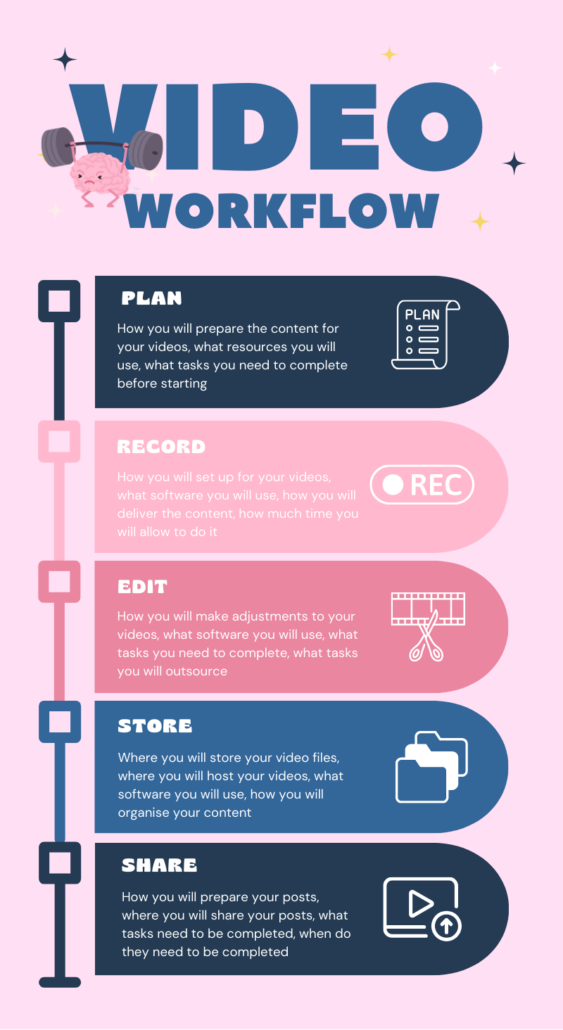
Having the vocabulary and a basic understanding of how video works makes the whole world of video a lot easier to make sense of and gives you the clarity you need to take the next steps.